Elias Matriano · systems thinker · ML-literate AI builder

Hi, I’m Elias. I design AI systems you can run, inspect, and show.

Years as a deep AI consumer left me with real machine-learning literacy: parameters, weights, vectors, tokenization math, training loops, data factories, and pipelines—not just chat prompts. I still build with systems thinking first and use AI coding agents heavily for implementation; I learn syntax on demand and can read code when needed. Clear architecture, honest demos, and visuals that make the idea land.

  • 5 projects
  • ML literacy
  • Systems first
Portrait of Elias Matriano

Focus

What I actually bring

Four honest lanes: machine learning literacy, systems thinking, shipping with AI coding agents, and graphic design by hand. Strong on ML concepts, training, data, and hardware—not on claiming I hand-code every stack without tools.

  • 01

    Machine learning literacy

    Long-time AI consumer with substantial knowledge across abstraction, technical vocabulary, and engineering practice: how params, weights, and vectors relate; the math behind token generation; how to train effectively; dataset factories; pipelines; architectures; model interventions such as abliteration; and GPU / hardware intuition.

    • Params, weights, embeddings/vectors, and how they interact
    • Tokenization & generation math at a working technical level
    • Training practice: data quality, loops, eval, failure modes
    • Dataset factories, pipeline engineering, architecture design
    • Abliteration / model editing concepts; ML terminology fluency
    • Hardware literacy—especially GPUs—setup, limits, and fixes
  • 02

    Systems & product thinking

    I start from the whole picture: user job, data flow, failure modes, and what “done” looks like. Abstract structure first; tools second. Framing AI products so they stay inspectable and demoable.

    • Architecture sketches before implementation details
    • Clear pipelines (RAG, agents, automation) as systems, not vibes
    • Human gates where real data or money moves
    • Scope control: what must ship vs what can wait
    • Storytelling: demos and portfolios that match the design
  • 03

    AI-assisted building

    I overwhelmingly use AI coding agents to implement. I learn code deliberately when a project needs it, and I can read or reason about code when something fails. Some HTML, CSS, Java, and Python syntax—enough to steer, check, and learn on demand.

    • Heavy use of AI agents for implementation and iteration
    • On-demand learning of syntax and patterns for each project
    • Code reading when debugging or reviewing agent output
    • Familiarity with HTML, CSS, Java, and Python basics
    • Local demos shaped by product + ML intent
  • 04

    Graphic design (by hand)

    Visual work is a real personal skill: posters and similar graphics I produce myself. Website look I direct at concept level; I do not claim to hand-code every layout without AI assistance.

    • Posters and graphic design I create myself
    • Visual hierarchy, type, and composition for product stories
    • Direction for UI look (theme, mood, demo screenshots)
    • Portfolio and presentation polish
    • Honest split: design intent mine; much UI code agent-assisted

Local RAG Chatbot

Explicit retrieval and local models, with no LangChain black box.

Portfolio-grade, local-only RAG chat: FastAPI + ChromaDB + bge-small embeddings + Qwen via Ollama, with a plain HTML/CSS/JS frontend. Every retrieval step is explicit and interview-explainable.

Meet Lumen: retrieve relevant chunks from a local Chroma index, ground answers in your docs (or live web results), and generate on your machine. Compare with vs without RAG so the value of retrieval is visible, not assumed.
  • Python
  • FastAPI
  • ChromaDB
  • bge-small
  • Ollama / Qwen
  • HTML / CSS / JS
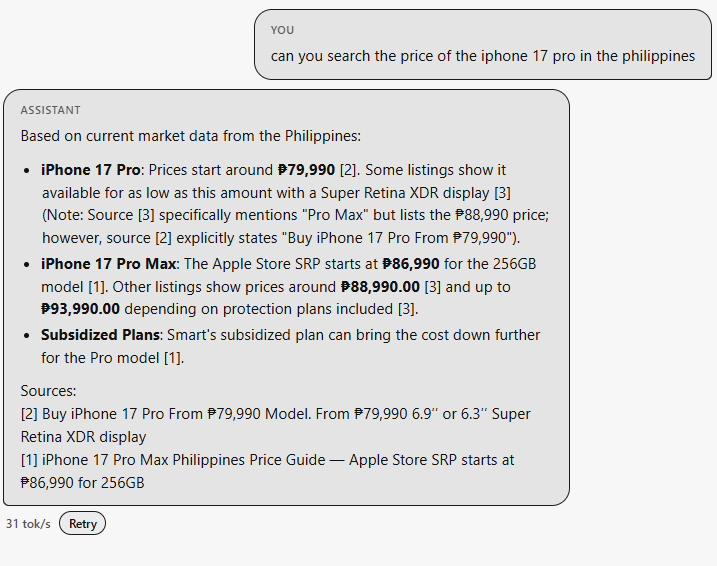
Lumen answering an iPhone price question with live web search and numbered sources

Feature 01 · Live search

Web search with cited sources

Ask about current market data and Lumen can pull live results, structure the answer with clear bullets, and attach numbered sources under the reply so every claim stays checkable, not hallucinated.

  • Live web lookup for time-sensitive facts
  • Numbered source list under each answer
  • Generation speed shown (tok/s) + Retry
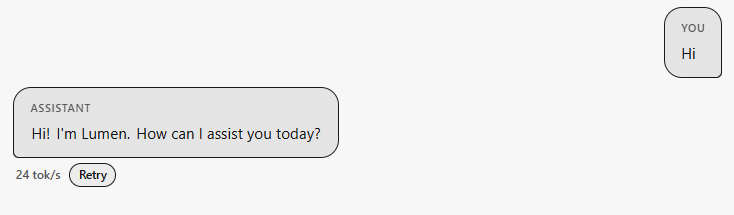
Lumen chat greeting with token speed metric and retry control

Feature 02 · Local chat

Streaming replies you can measure

Clean chat UI with role-labeled bubbles. Each assistant turn reports generation speed in tokens per second so local model performance is visible, and a one-click Retry regenerates when the first draft misses.

  • Lumen persona + clear You / Assistant roles
  • Live tok/s metric on every completion
  • Retry without retyping the prompt
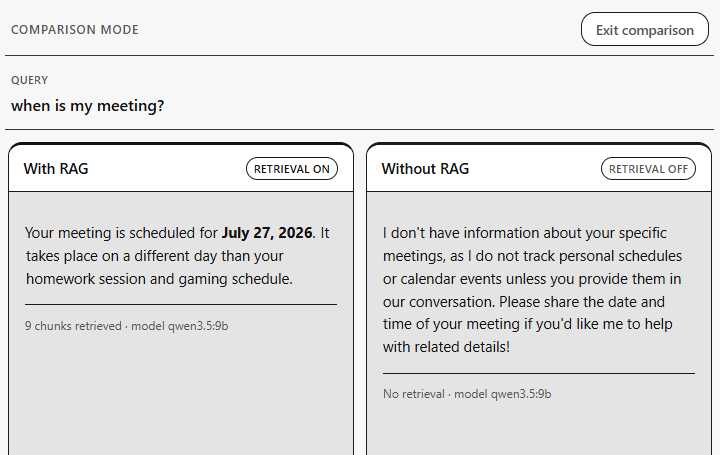
Comparison mode showing With RAG versus Without RAG answers side by side

Feature 03 · Comparison mode

With RAG vs without, same query

Flip into comparison mode and run one question against both pipelines. Retrieval-on grounds the answer in your indexed docs (chunk counts included); retrieval-off shows what the base model invents without your knowledge base.

  • Side-by-side With RAG / Without RAG panels
  • Chunk count + model id on each path
  • Makes retrieval impact demo-ready for interviews
Skills

Honest self-assessment

Bars are relative comfort. Machine learning and systems knowledge are real strengths from years of deep AI use. Application code is mostly AI-assisted; I learn syntax on demand and read code when needed.

Machine learning & systems

  • ML concepts · params, weights, vectors Strong 85%
  • Token generation math · training practice Strong 80%
  • Dataset factories · pipelines · architectures Strong 82%
  • Model editing · abliteration · ML terminology Solid 75%
  • GPU & hardware literacy · troubleshooting Solid 78%
  • Systems & product thinking Strong 80%

Build · design · code comfort

  • Directing AI coding agents Strong 85%
  • Graphic design · posters & visuals Solid 75%
  • Reading / understanding code when needed Working 55%
  • HTML · CSS · Python · Java (basics) Familiar 45%
  • Hand-coding full apps without AI Limited 30%
  • Deep app-framework coding (React etc. by hand) Limited 25%

AI Dungeon Master

Structured roleplay with world state, deltas, and streaming turns.

A web-based choose-your-own-adventure where the dungeon master is not a free-form chatbot—it is a pipeline. World gen builds factions, locations, NPCs, and constraints; each turn returns narrative, four choices, and a validated StateDelta applied to a structured store.

Context is assembled from lore, scene, flags, and a running summary. Models are chosen at setup: cloud Anthropic Claude or local Ollama. The UI streams progress so you watch the realm write itself in real time.

  • React 19
  • TypeScript
  • Vite
  • FastAPI
  • Pydantic
  • Ollama / Claude
  • SSE
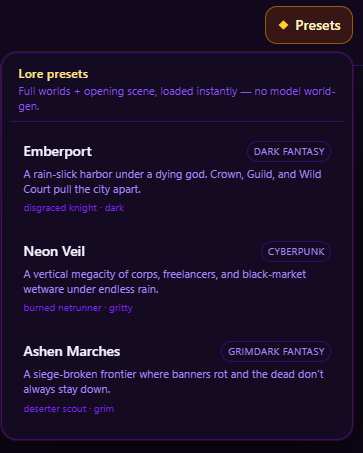
Lore presets panel with Emberport, Neon Veil, and Ashen Marches worlds

Feature 01 · Lore presets

Full worlds, loaded instantly

Skip cold-start world-gen when you want a sharp first scene. Curated lore presets ship full settings and opening hooks—dark fantasy harbors, cyberpunk megacities, grim frontiers—ready to play.

  • Instant load: full world + opening scene, no model world-gen wait
  • Genre tags: dark fantasy, cyberpunk, grimdark, and more
  • Archetype seeds (e.g. disgraced knight) baked into each preset
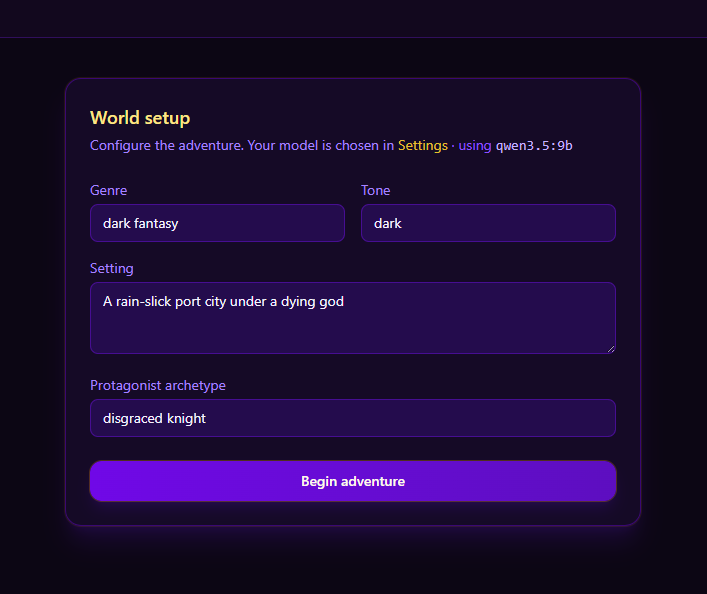
World setup form with genre, tone, setting, and protagonist archetype

Feature 02 · World setup

Configure genre, tone, and hero

Custom adventures start from a clear setup sheet: genre, tone, freeform setting, and protagonist archetype. The active model is visible up front so local vs cloud choice is never a mystery.

  • Structured fields instead of a blank chat box
  • Model shown in-line (e.g. local qwen via Ollama)
  • One-click Begin adventure into the turn pipeline
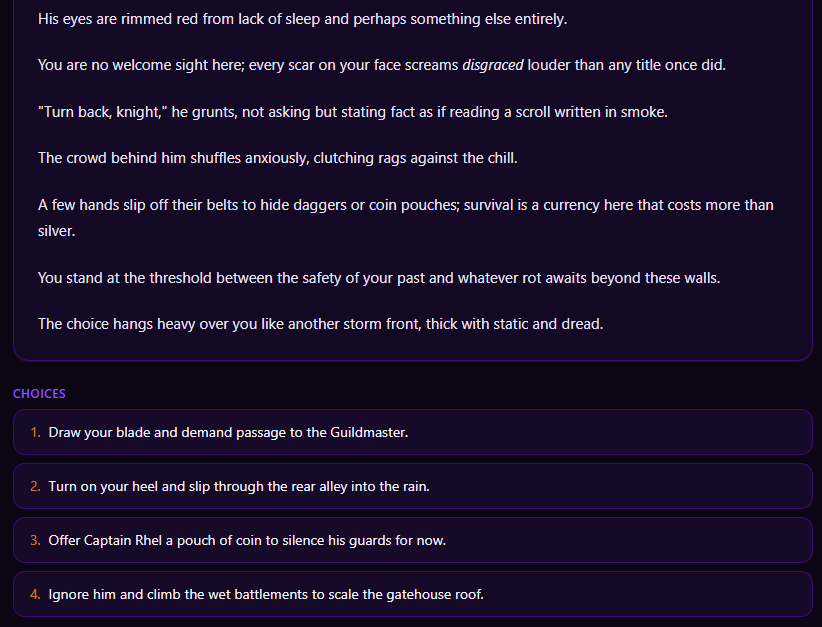
Narrative prose with four numbered player choices

Feature 03 · Turn stream

Narrative plus four grounded choices

Each turn streams prose, then locks in four numbered options. Behind the scenes the model also emits a state delta so factions, locations, and flags stay consistent across a long campaign.

  • Streaming narrative with roleplay-ready detail
  • Exactly four choices per turn for clear agency
  • Validated StateDelta applied to structured world state
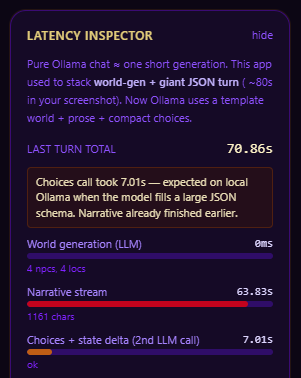
Latency inspector showing world gen, narrative stream, and choices timing

Feature 04 · Latency inspector

See where the seconds go

Local models make timing honest. The latency inspector breaks down world generation, narrative stream length, and the choices + delta call so you can tune templates and schemas instead of guessing.

  • Per-phase timings (world gen, narrative, choices + delta)
  • Char counts and status for the last turn
  • Built for Ollama / local JSON-schema turn pipelines

Process

How I build

How projects actually get done for me: systems first, AI agents for most implementation, deliberate learning when syntax is required, then a demo I can explain—not a claim that I hand-wrote every file alone.

  1. 01

    Frame the problem

    Lock the user job, constraints, and what “done” looks like before picking tools or models. Prefer a sharp scope over a vague “add AI.”

  2. 02

    Design the system & ML path

    Sketch data flow, training or inference path, state, and failure modes. Choose architectures, data shape, and hardware reality (especially GPUs) so the product stays inspectable and trainable.

  3. 03

    Implement with AI coding agents

    I overwhelmingly use AI agents to write and iterate on code. I steer, review, and re-prompt; I learn specific syntax when the project needs it instead of memorizing every stack in advance.

  4. 04

    Read and fix when needed

    When something breaks, I open the code, understand the path, and guide the next change. Comfort with reading HTML, CSS, Python, and Java goes further here than pretending to be a pure hand-coder.

  5. 05

    Ship a local demo

    Get something runnable early (local models, simple apps, clear UI). Bad answers and rough edges show up before polish hides them.

  6. 06

    Visuals and story

    Graphic design (posters, composition) I can do myself. Product UI direction I own; much of the implementation is still agent-assisted. End with a story you can walk through in an interview.

AI Finance Tracker

Personal finance product UI with ledger truth and tool-using chat.

A full client app for day-to-day money tracking—not a chart demo. Cash vs online balances, monthly net, spending breakdowns, and a transaction ledger you can search, sort, and toggle live.

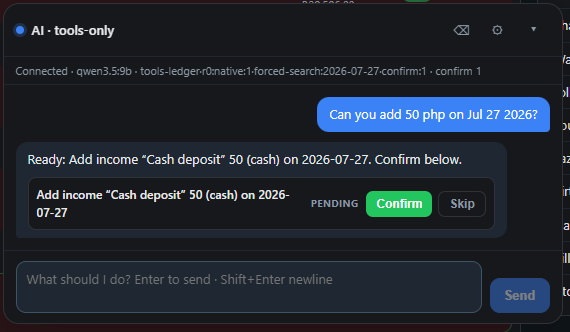
Meet the AI · tools-only lane: a local model proposes ledger actions (e.g. add income) as explicit tool calls you Confirm or Skip—so the assistant never silently rewrites your books.

  • TypeScript
  • Vite
  • React
  • Local LLM tools
  • Ledger UI
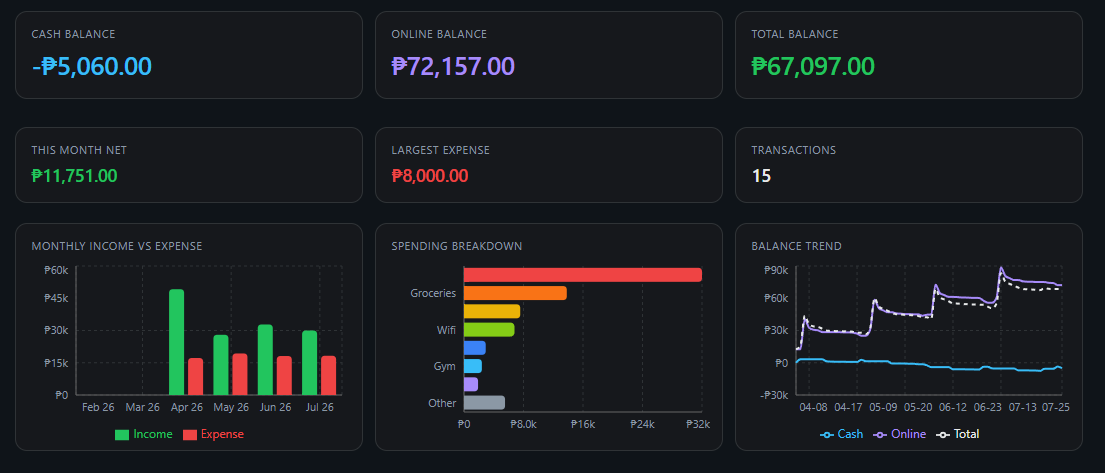
Finance dashboard with cash, online, and total balances plus charts

Feature 01 · Dashboard

Balances and trends at a glance

Hero metrics for cash, online, and total balance sit above income-vs-expense bars, a spending breakdown, and a multi-series balance trend—so you see health before you scroll the ledger.

  • Cash / online / total balance cards
  • Monthly income vs expense + category breakdown
  • Balance trend across cash, online, and total
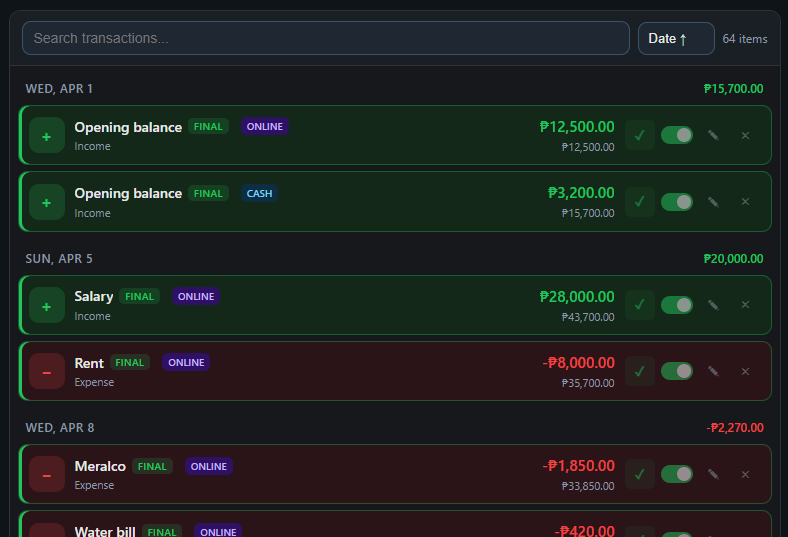
Transaction ledger with income and expense rows, search, and toggles

Feature 02 · Ledger

Searchable day-to-day transactions

The ledger groups by day with running context: salary, rent, utilities, opening balances—each tagged ONLINE or CASH, FINAL status, and quick enable/edit/remove controls.

  • Search + date sort across the full item set
  • Income (green) / expense (red) visual language
  • Channel tags and live toggles per row
AI tools-only chat proposing an income entry with Confirm and Skip

Feature 03 · Tools chat

Propose, then you confirm

Natural language like “add 50 php on Jul 27” becomes a pending tool action with a clear payload. Nothing hits the ledger until you confirm— tools-only mode keeps the model on structured actions, not free-form edits.

  • Local model tool calls (e.g. qwen) with forced-search flags
  • Pending action cards with Confirm / Skip
  • Human gate on every money-moving mutation

Quality bar

What I optimize for

When tradeoffs appear, these are the axes I protect first—especially for ML-aware products, local demos, and ops pipelines.

  • 01

    Data & training quality

    Bad data and lazy train loops waste GPU time. Dataset factories, clean labels, and eval before scale—not vibes-only fine-tunes.

  • 02

    Explainability

    Retrieval, tool calls, and decisions should be visible. If you cannot show the path, you cannot debug or trust it in an interview—or production.

  • 03

    Human-in-the-loop

    Confirm, skip, review, and audit gates on anything that spends money, writes a ledger, or commits extracted fields. Autonomy without a kill switch is a liability.

  • 04

    Source-of-truth UI

    Put the PDF, the doc, or the state next to the model output. Ground truth stays open so operators never have to “believe the bubble.”

  • 05

    Local deploy · GPU reality

    Prefer stacks that run on your machine when possible—Ollama, local weights, honest VRAM limits—so demos match real hardware, not only a cloud key.

  • 06

    Demo readiness

    Screenshot-worthy UI, clear failure modes, and a narrative you can walk through live. A model without a surface people can use is half a product.

  • 07

    Boring ROI when it wins

    Intake → extract → review → export often beats chat theater. Optimize for hours saved and errors caught, not for looking futuristic.

Clearpost · Invoice automation

Intake, review, and export for messy real-world PDFs.

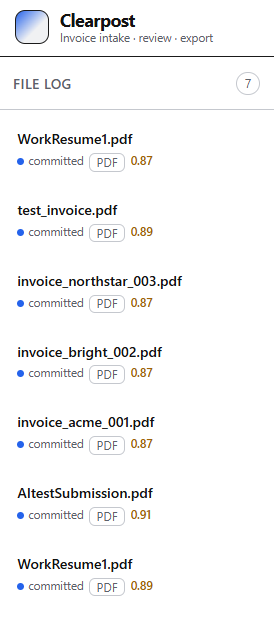
Document automation built for ops reality: drop invoices into a file log, extract structured fields with confidence scores, and open a side-by-side review where the PDF and parsed records stay aligned.

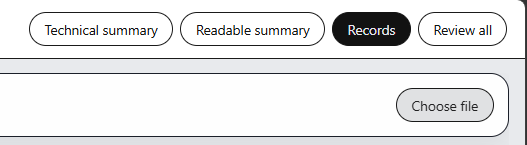
Modes cover technical summaries, readable summaries, structured Records, and full review—so different roles can consume the same pipeline without re-running inference.

  • Python
  • PDF / OCR
  • Document AI
  • Review UI
  • Export
Clearpost file log listing committed PDF invoices with confidence scores

Feature 01 · File log

Intake queue with confidence

Every uploaded PDF lands in a committed file log: filename, type, and a confidence score so operators see which docs are ready and which need a closer look before export.

  • Invoice intake → review → export pipeline framing
  • Per-file confidence (e.g. 0.87–0.95)
  • Clear status chips for committed PDFs
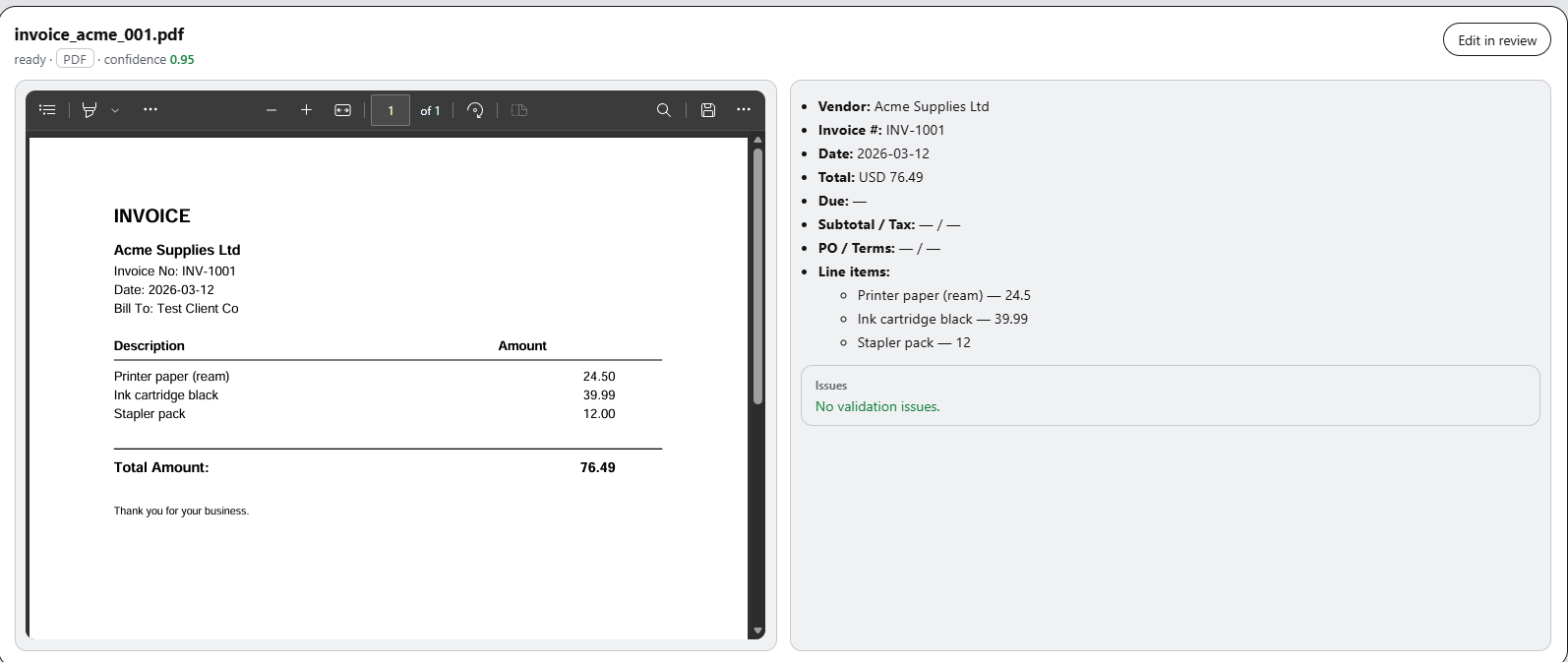
Side-by-side invoice PDF viewer and extracted vendor, line items, and validation

Feature 02 · Side-by-side review

PDF truth next to extracted fields

Review mode puts the source invoice beside structured extraction: vendor, invoice number, date, totals, and line items—with validation issues surfaced when something does not add up.

  • Embedded PDF viewer with page controls
  • Structured fields + line-item breakdown
  • Validation status and Edit in review path
Mode tabs for technical summary, readable summary, records, and review all

Feature 03 · Output modes

One pipeline, four reading modes

Switch between technical summary, readable summary, structured records, and full review without re-uploading. Choose file when you need a new document; stay in-mode when you are auditing a batch.

  • Tabbed modes for different stakeholders
  • Records mode for structured downstream export
  • Lightweight choose-file entry for new intake

Education

Where I’ve studied

High school · 2019 – 2024

Marcial B. Villanueva National High School

ICT Strand

Senior high school with a strong Information and Communications Technology focus—foundations in computing, digital systems, and practical project work that led into AI product demos and systems building.

  • ICT strand coursework: computing fundamentals and digital literacy
  • Hands-on projects that built problem-solving and documentation habits
  • Early exposure to software, media, and systems thinking
  • 2019 – 2024 · foundation for Computer Science at STI Lucena

Where I’m currently studying

University · 2024 – 2028

STI College Lucena

Bachelor of Science in Computer Science

Actively studying Computer Science while shipping portfolio AI systems: local agents, RAG chatbots, automation pipelines, and product UIs. Coursework and self-directed builds reinforce each other.

  • Core CS: algorithms, software design, databases, and systems
  • Parallel track: local LLMs, RAG, agents, and AI-assisted demos
  • Goal: ship explainable AI products, not only classroom exercises
  • Expected path · 2024 – 2028

Research Agent

Plan → act → observe with a live inspector and cited answers.

Multi-step research agent for multi-part questions: plan the work, call tools (search, fetch), replan when needed, and synthesize a grounded answer with citations—no black-box chain.

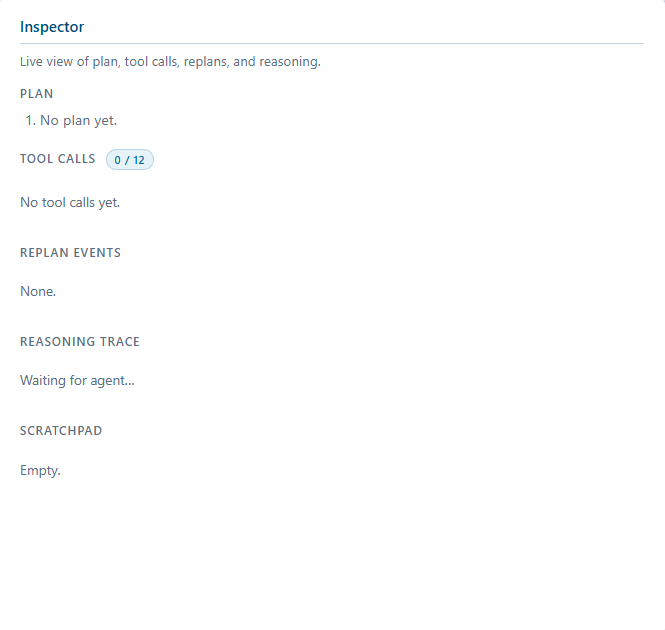
The UI splits Query / Answer from a live Inspector so you can watch plan steps, tool-call budget, replan events, reasoning trace, and scratchpad as the agent runs.

  • Python
  • FastAPI
  • Ollama / Qwen
  • Tavily
  • trafilatura
  • httpx
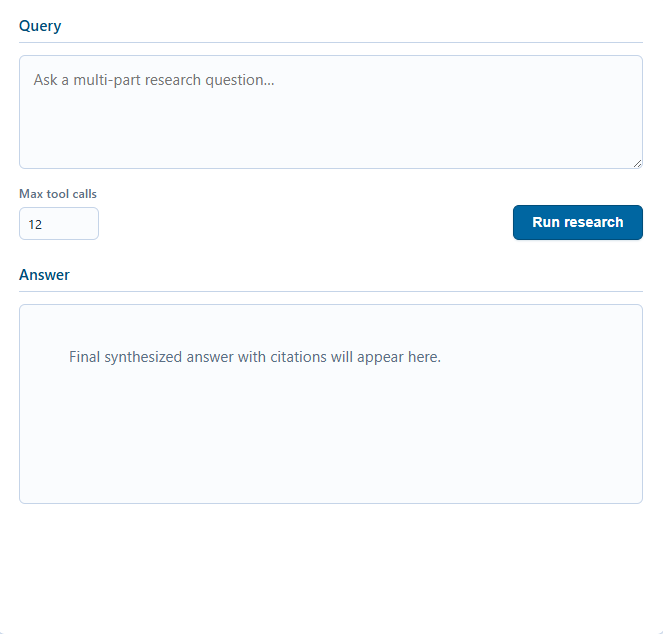
Research agent query panel with multi-part question, max tool calls, and answer area

Feature 01 · Query surface

Multi-part questions, capped tools

Start with a research question and an explicit max tool-call budget. The answer pane is reserved for the final synthesized reply with citations—clean separation between ask, run, and result.

  • Multi-part research prompt field
  • Configurable max tool calls (e.g. 12)
  • Dedicated answer region for cited synthesis
Live inspector showing plan, tool calls, replan events, reasoning trace, and scratchpad

Feature 02 · Live inspector

Plan, tools, replans—fully visible

The inspector streams the agent’s working memory: current plan, tool-call counter, replan events, reasoning trace, and scratchpad. Built for interviews and debugging, not opaque “thinking…”.

  • Live plan steps and replan events
  • Tool call budget (e.g. 0 / 12) always on screen
  • Reasoning trace + scratchpad for auditability

Available for hire

I’m open to roles and contracts where ML literacy, systems thinking, AI product demos, and honest collaboration matter—more than pretending I hand-code every app stack alone. Full-time, part-time, fixed-term, or freelance. Reach me at +63 927 627 2163 or eliasmatriano555@gmail.com.

  • Full-time
  • Part-time
  • Fixed term
  • Freelance contracts

Strongest fit: machine learning understanding (training, data factories, architectures, model behavior, GPUs), product/architecture direction for AI demos, graphic design for posters and visuals, and shipping with AI coding agents under clear scope. Strong next to deep software engineers who want a partner fluent in ML concepts and system design.

What I offer (honest levels)

Same scale as the Skills section—ML and systems high; hand-coding apps lower:

  • ML concepts · training · data · architectures 85%
  • Dataset factories · pipelines · model editing 80%
  • GPU & hardware literacy 78%
  • Systems & product thinking 80%
  • Directing AI coding agents 85%
  • Graphic design · posters & visuals 75%
  • Hand-coding full apps without AI 30%

Interview assistant (ask about Elias)

On-demand chat trained on Elias’s public portfolio and resume: projects, skills, education, process, and hire fit. Built for employers—off-topic questions are refused. (Full local RAG is Project 01 · Lumen.)

Idle — wakes when you use this box

Hi — I’m Elias’s portfolio interview assistant. Ask about his background, skills, the five projects, research, or role fit. Unrelated questions get a polite no.

Powered by a Cloudflare Worker + free Workers AI model. Knowledge is Elias’s public site and resume—not private docs. Full RAG stack: Lumen.

Let’s talk

Open to roles, collabs, and AI product problems where ML literacy, systems thinking, and clear demos matter—and where AI-assisted building is welcome.

Messages go to my email. I usually reply within a day or two.

Writing & design papers

Literature-grounded work for synthetic dataset engineers—architecture and viability, not leaderboard theater.

Design paper · 2026

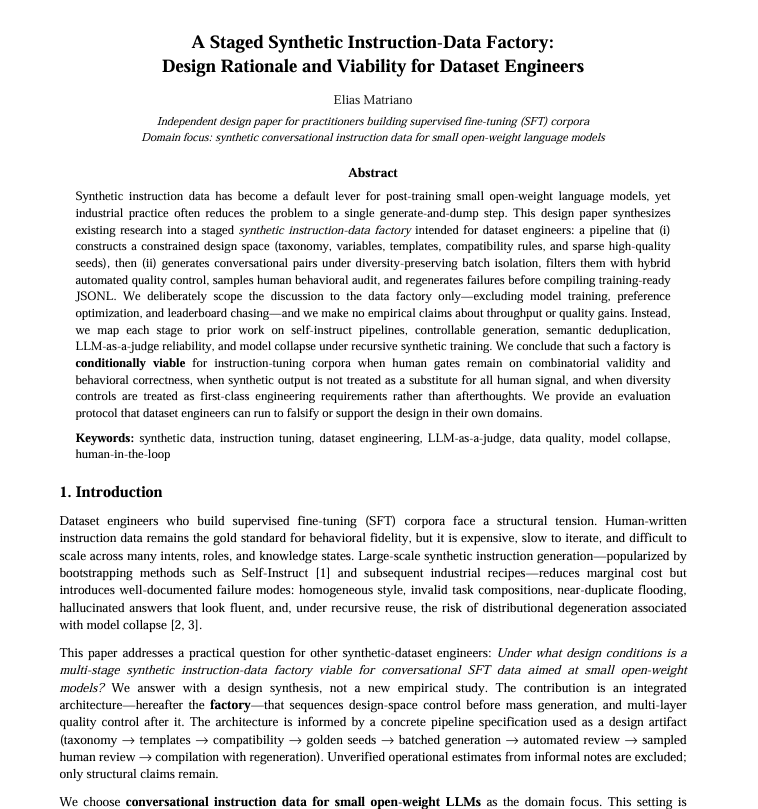
A Staged Synthetic Instruction-Data Factory: Design Rationale and Viability for Dataset Engineers

Conversational SFT data for small open-weight models—when is a multi-stage factory viable?

A practitioner-facing design synthesis of a two-phase synthetic instruction-data factory: constrained design space (taxonomy, variables, compatibility, golden seeds) followed by airgapped generation, hybrid automated QC, stratified human audit, and regeneration with lineage. Maps each stage to prior work on Self-Instruct, LLM-as-a-judge, and model collapse. Concludes conditional viability under explicit human gates and diversity controls—and includes a falsifiable validation protocol for engineers.

  • Domain: synthetic conversational instruction data (SFT / ChatML)
  • Scope: data factory only (P1–P8)—no training or benchmark claims
  • Audience: synthetic dataset engineers
  • Type: design / architecture paper with literature-backed viability analysis

Ongoing projects

Active fine-tunes on small open models—where training practice, data design, and role separation matter as much as the final demo UI.

Fine-tune · 1B router

Llama 3.2 1B · Mixture-of-Agents router

Routing specialist that picks which specialist agent should answer.

Fine-tuning Meta Llama 3.2 1B Instruct as a lightweight mixture-of-agents router: classify the user intent, choose the right worker (research, code, RAG, ops, creative), and emit a structured handoff. Small enough to run locally; sharp enough to keep a multi-agent graph from thrashing.

  • Base model: Llama 3.2 1B Instruct (~1B params)
  • Role: intent classification + agent selection for MoA stacks
  • Outputs: route id, confidence, short rationale, optional rewrite
  • Training focus: multi-domain prompts, ambiguous intents, refusals
  • Deploy target: Ollama / local runtime as first hop before specialists

Fine-tune · 2B tool caller

Gemma 2 2B · 15-tool function caller

Tool-using specialist that plans and invokes a fixed tool belt.

Fine-tuning Google Gemma 2 2B IT as a dedicated tool caller that can select and invoke up to 15 tools—search, fetch, file ops, calculators, structured stores, and custom APIs—with valid argument schemas and multi-step call chains. Pairs with the 1B router: router chooses the lane; this model executes tool-heavy work.

  • Base model: Gemma 2 2B IT (~2B params)
  • Role: multi-step tool use with schema-valid JSON / function calls
  • Tool belt: up to 15 registered tools (search, fetch, compute, I/O…)
  • Training focus: argument accuracy, tool order, recovery from errors
  • Deploy target: local agent worker behind the MoA router